Every year, falls send more than 78,000 Canadian seniors to the hospital. They are the leading cause of injury-related hospitalization - and death - among Canadians aged 65 and older, according to the Public Health Agency of Canada. Between 2017 and 2022, fall-related deaths among older adults rose by 51%. To understand why Canadian seniors fall and how to stay steady, the numbers paint a concerning picture.
Behind every statistic is a real fear shared by millions of Canadian families: What happens if Mom falls and nobody is there?
Fall detection technology was built to answer that question. These devices use sensors and intelligent algorithms to detect when a fall occurs and automatically call for help - even when the person wearing the device can't press a button. For seniors living independently and for the adult children who worry about them, fall detection offers something that phone check-ins and security cameras simply can't: an automatic safety net that works around the clock.
This guide breaks down how fall detection actually works, what types of devices are available in Canada, and what to look for when choosing one.
Table of Contents
- How Fall Detection Technology Works
- Types of Fall Detection Devices Available in Canada
- What to Look for in a Fall Detection Device
- Fall Detection vs. Manual SOS Buttons: Do You Need Both?
- Common Questions About Fall Detection
- How to Get Started With Fall Detection in Canada
How Fall Detection Technology Works
Fall detection might sound futuristic, but the technology behind it is well-established and improving every year. Here's what's actually happening inside that small device on your wrist or around your neck.
The Sensors
Every fall detection device contains two core sensors:
- Accelerometers measure changes in speed and direction across three axes. They track how fast something is moving and whether it suddenly stops - the signature pattern of a fall.
- Gyroscopes track rotational movement and orientation. They help the device understand whether the wearer's body has shifted from an upright position to a horizontal one.
Together, these sensors build a real-time picture of how the wearer is moving - standing, sitting, walking, bending, or falling.
The Algorithm
Raw sensor data alone isn't enough. A person sitting down quickly or bending to tie a shoe generates motion patterns that could look like a fall to a simple sensor. That's where the algorithm comes in.
Modern fall detection devices use AI-powered algorithms trained on thousands of real-world fall scenarios. These algorithms analyze the full motion sequence - the initial acceleration, the impact, the change in body orientation, and whether the person remains still afterward. Advanced systems using machine learning can distinguish genuine falls from everyday movements with over 97% accuracy, reducing false alarms by up to 30% compared to older sensor-only approaches.
What Happens When a Fall Is Detected
When the device determines a fall has occurred, it triggers an automatic sequence:
- Alert countdown - The device vibrates or beeps, giving the wearer a short window (typically 10 to 30 seconds) to cancel the alert if it was a false alarm.
- Automatic call - If the wearer doesn't cancel, the device contacts a 24/7 monitoring centre through its built-in cellular connection.
- Two-way voice - A trained operator speaks directly through the device to assess the situation, even if the wearer can't reach a phone.
- Emergency dispatch - If the wearer is unresponsive or needs help, the operator contacts emergency services and shares the wearer's location.
Important to know: No fall detection system catches every fall. Gradual slides, slow collapses, or certain movements may not trigger an alert. That's why the best devices combine automatic fall detection with a manual SOS button - so the wearer always has a way to call for help.
Types of Fall Detection Devices Available in Canada
Not all fall detection devices are created equal. The right choice depends on your lifestyle, comfort preferences, and how much coverage you need. Here's how the main categories compare.
Wearable Pendants
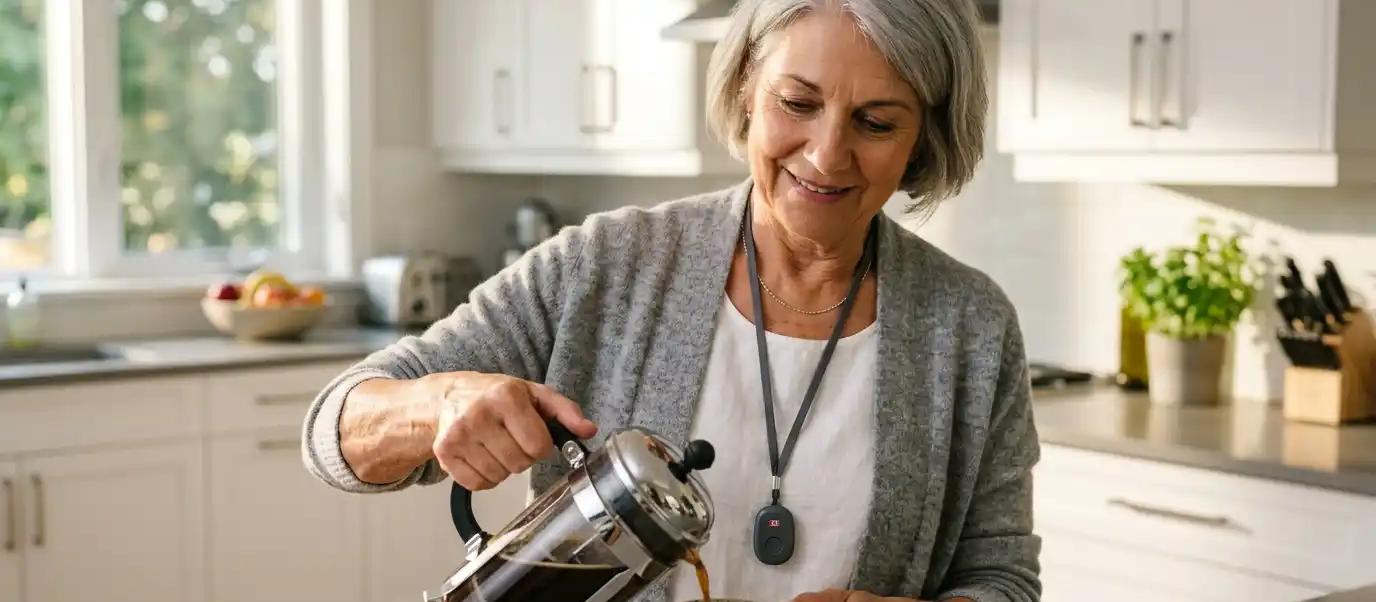
A pendant hangs around the neck on a lanyard and doubles as a one-press SOS button.
Best for: Seniors who prefer something lightweight and simple that doesn't look like a watch. Pendants work well for people who don't typically wear wristwear or who want the option to clip the device to a belt.
What to look for: Cellular connectivity (so it works without Wi-Fi or a landline), water resistance for shower safety, and fall detection that's included at no extra cost. Some pendants also include GPS and location tracking, which is especially useful for seniors who are active outside the home.
Example: The Holo Pro is a pendant-style device with built-in fall detection, GPS location services, two-way HD voice, and a caregiver app - all running on Canada's cellular network with no Wi-Fi or landline required.
Smartwatches With Fall Detection
A wrist-worn device that looks and feels like a regular watch while packing fall detection, health monitoring, and emergency communication into one device.
Best for: Seniors who want a modern-looking device they'll actually wear every day. Smartwatches appeal to people who resist traditional medical alert devices because they don't want something that looks clinical.
What to look for: Touchscreen usability for seniors (large icons, simple menus), battery life of at least 24 hours, water resistance, and - critically - a direct connection to a professional monitoring centre. A smartwatch that only sends a notification to a family member's phone is not a medical alert system.
Example: The Holo Active Slim looks like a regular smartwatch but includes automatic fall detection, heart rate monitoring, two-way voice with a 24/7 monitoring centre, and a long-lasting battery.
Medical Alert Bracelets
A compact wrist-worn device designed for simplicity over features.
Best for: Seniors who want the smallest, lightest option possible. Bracelets prioritize comfort and discretion - they're easy to forget you're wearing, which is exactly the point.
What to look for: Weight under 50 grams, water resistance, and a simple SOS activation (one press, not a complicated sequence). Fall detection on bracelet-style devices may be optional rather than included, so confirm before purchasing.
Example: The Holo Mini weighs just 1.2 ounces and fits on the wrist, with optional fall detection optimized for wrist wear and a 12-second cancel window to prevent false alarms.
For a deeper comparison of bracelet-style options, see our guide to the best medical alert bracelets in Canada.
Non-Wearable Fall Detection (Home Sensors)
These systems use motion sensors, radar, or cameras placed around the home to detect falls without requiring the senior to wear anything.
Best for: Seniors who refuse to wear any device, or those with cognitive conditions like dementia who may remove a wearable.
Limitations: Non-wearable systems only work inside the home. They don't provide coverage when a senior goes for a walk, visits a friend, or runs errands. They also tend to be more expensive and may raise privacy concerns.
What to Look for in a Fall Detection Device
With so many options on the market, choosing the right device can feel overwhelming. Focus on these seven factors to cut through the noise.
1. Fall Detection Included - Not an Add-On
Some companies charge $5 to $15 per month extra for fall detection. Others include it at no additional cost on every device. Since fall detection is the reason most families start looking at medical alert systems in the first place, choose a provider that doesn't treat it as a premium upgrade.
2. Cellular Connectivity
A device that relies on Wi-Fi or a landline only works inside the home - and only as long as the power stays on. Look for devices with built-in 4G cellular connectivity that work anywhere in Canada where there's cellular coverage. This is especially important for seniors in rural areas or anyone who spends time outdoors.
3. Water Resistance
The bathroom is where most in-home falls happen. Your device should be rated IP67 or higher, meaning it's safe to wear in the shower. If it needs to come off for water, it's not protecting the wearer when they need it most.
For more on this topic, see our guide to waterproof medical alert systems in Canada.
4. Battery Life
A device that dies every 12 hours creates gaps in protection. Look for realistic battery life (not just the manufacturer's best-case scenario). Most quality devices offer 24 to 48 hours on a full charge with fall detection active. Magnetic charging cradles make nightly charging simple.
5. 24/7 Professional Monitoring
This is non-negotiable. When a fall is detected, the alert needs to reach trained emergency operators - not just a phone notification to a family member who might be in a meeting, asleep, or on a flight. Professional monitoring centres are staffed around the clock with operators trained in emergency response protocols.
For Canadian seniors, look for monitoring centres located in Canada. This ensures operators understand the Canadian healthcare system, speak both official languages, and can coordinate with local emergency services without delays.
6. Location Services
GPS and cellular location tracking allow monitoring operators to find the wearer even if they can't describe where they are - critical for falls that happen on a walk, in a parking lot, or while visiting someone.
7. Caregiver Features
Some devices pair with a caregiver app that gives family members real-time location, step tracking, and instant alerts on their own phone. This bridges the gap between check-in calls and full-time care, giving adult children peace of mind without hovering.
Fall Detection vs. Manual SOS Buttons: Do You Need Both?
Short answer: yes.
A manual SOS button lets the wearer press a button and immediately connect with a monitoring centre. It's simple, reliable, and works perfectly when the person is conscious and able to act.
But falls don't always go that way. A senior who hits their head may lose consciousness. Someone who falls in the shower may be in too much pain or shock to press a button. A person with limited mobility may not be able to reach their device after landing on the floor.
Fall detection fills the gap that manual buttons can't. It activates automatically, without any action from the wearer. The best devices include both - so the senior has a way to call for help whether they can press a button or not.
Statistics back this up. According to Canada's Health Infobase, fall-related emergency department visits have been climbing steadily over the past decade, with over 200,000 visits recorded in Ontario and Alberta alone. Many of these involved seniors who were alone when they fell and couldn't call for help themselves.
Related reading: What to Do After a Senior Falls: A Canadian Family's Complete Guide
Common Questions About Fall Detection
Does fall detection work for all types of falls?
No. Fall detection is highly accurate for sudden, impact-based falls - the kind where someone trips, slips, or loses balance and hits the ground. It is less reliable for gradual slides (like slowly sliding out of a chair) or collapses where the body moves downward slowly. That's why having a manual SOS button alongside fall detection is essential.
Will it trigger false alarms?
Modern AI-powered fall detection has significantly reduced false alarms compared to older systems. Activities like sitting down quickly, bending over, or dropping something rarely trigger alerts on well-designed devices. Most devices also include a cancel window - typically 10 to 30 seconds - so the wearer can dismiss a false alert before it reaches the monitoring centre.
Does it work outside the home?
Only if the device has its own cellular connection. Wearable devices with built-in 4G cellular connectivity work anywhere in Canada with cellular coverage - at the grocery store, on a walk, at a friend's house, at the cottage. Devices that rely on a home base station, Wi-Fi, or a landline only provide fall detection within range of that connection.
For tips on staying safe while travelling, check out our post on safety for seniors at the cottage.
Does it work in the shower?
If the device is rated IP67 or higher, yes. IP67 means the device is protected against immersion in up to one metre of water for 30 minutes - more than enough for a shower. It's not rated for swimming, but shower safety is fully covered.
How much does fall detection cost in Canada?
Costs vary by provider. Some charge a separate monthly fee for fall detection on top of the base monitoring plan. Others include fall detection at no extra cost. Monthly monitoring plans in Canada typically range from $25 to $65 per month, depending on the device and features included.
Can provincial health programs help cover the cost?
Coverage varies by province. Some provincial programs - such as Ontario's Assistive Devices Program (ADP) or Veterans Affairs Canada's Veterans Independence Program - may cover or subsidize medical alert devices for eligible seniors. It's worth checking with your provincial health authority or asking your family doctor about available programs.
For veterans specifically, see our guide to the Veterans Independence Program.
How to Get Started With Fall Detection in Canada
Choosing a fall detection device doesn't need to be complicated. Here's a simple way to approach it:
Step 1: Decide on a form factor. Does the senior prefer a pendant, a wrist device, or a smartwatch? The best device is the one they'll actually wear every day.
Step 2: Confirm the essentials. Make sure the device includes fall detection (not as a paid add-on), cellular connectivity, water resistance, and 24/7 professional monitoring by a Canadian centre.
Step 3: Consider the caregiver. If an adult child or family member wants visibility into the senior's safety, look for devices with a companion caregiver app for real-time alerts and location.
Step 4: Try it risk-free. Many providers offer a trial period so the senior can test the device in their daily routine before committing. Holo Alert offers a 10-day risk-free guarantee - try it free for 10 days or get a full refund.
For a full comparison of available systems, see our complete guide to the best medical alert systems in Canada.
About Holo Alert
Holo Alert is Canada's trusted medical alert system. Our devices connect Canadian seniors to 24/7 professional monitoring at the press of a button - or automatically through built-in fall detection. No Wi-Fi, no smartphone, no landline required. Fall detection is included at no extra cost on every device. Plans start at $24.95/month.
Ready to explore your options? Compare Holo Alert devices or call us at 1-888-445-0192.
Fall detection does not detect all falls. Gradual slides, slow collapses, or certain movements may not trigger an alert. Customers should press the SOS button manually if able. Location accuracy varies and may be affected by network availability, indoor environments, and other factors. Holo Alert does not replace 911 or emergency medical services.